 WholeHome
 One platform for the whole kitchen & bath measuring cycle
Scan it with LiDAR, sketch it, draw a wall, or import the room from 2020. Walk the walls with a laser, a digital tape or the fraction keypad. Then open it in 2020 Design, ProKitchen or SketchUp as real walls.
I'm a homeowner: measure my home

Measuring a kitchen or a vanity is where pros and homeowners miss the most. A missed number is a mis-ordered cabinet or a return trip.
Trial room 262" × 230" · opened in 2020 Design 14.8.3.1 · no redraw
See the handoffEvery room of the home, each one ready for cabinets
A Project Board keeps the whole job in one place. Each room tile carries its own global information and its cabinet readiness: how many walls are measured, and whether the room closes within 1/8". Add a room, set its size, send it to a closet, duplicate it for the second bath.
WholeHome Measure is the only business software a kitchen and bath designer can use to run the full measuring cycle in one place: LiDAR scanning, sketch import, draw-a-wall, and import a room from 2020.
How a job moves from field to designer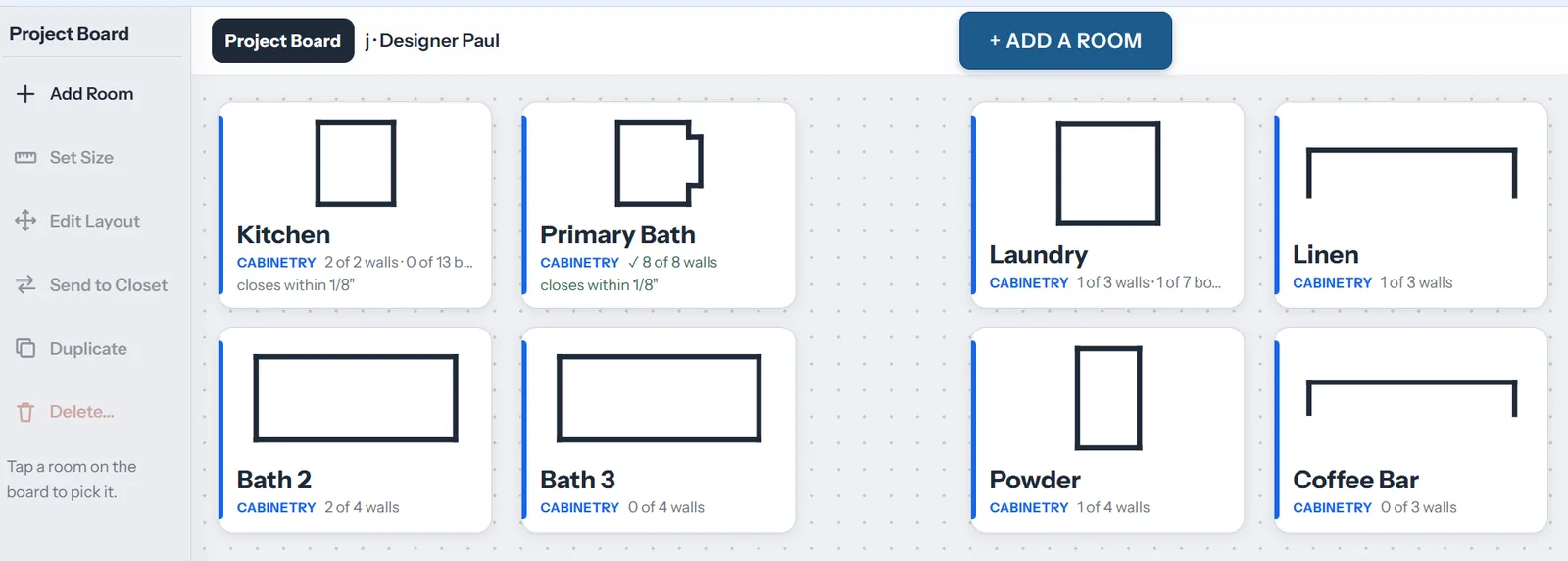
Shows where the cabinets go and where the utilities are
Workzones map the walls that cabinetry and vanities will use, with the plumbing centerlines and utilities on them. The plan is geared to the kitchen and bath trades, not to any room. Add the wall types a kitchen needs: room wall, construction wall for an island or peninsula, double construction wall for back-to-back cabinetry, and a pony wall at 34 1/2".
- Windows, doors and utilities placed to scale
- Plumbing centerlines on the workzone wall
- Saved plans open in the desktop planner, in 2D or 3D, to finish at the office
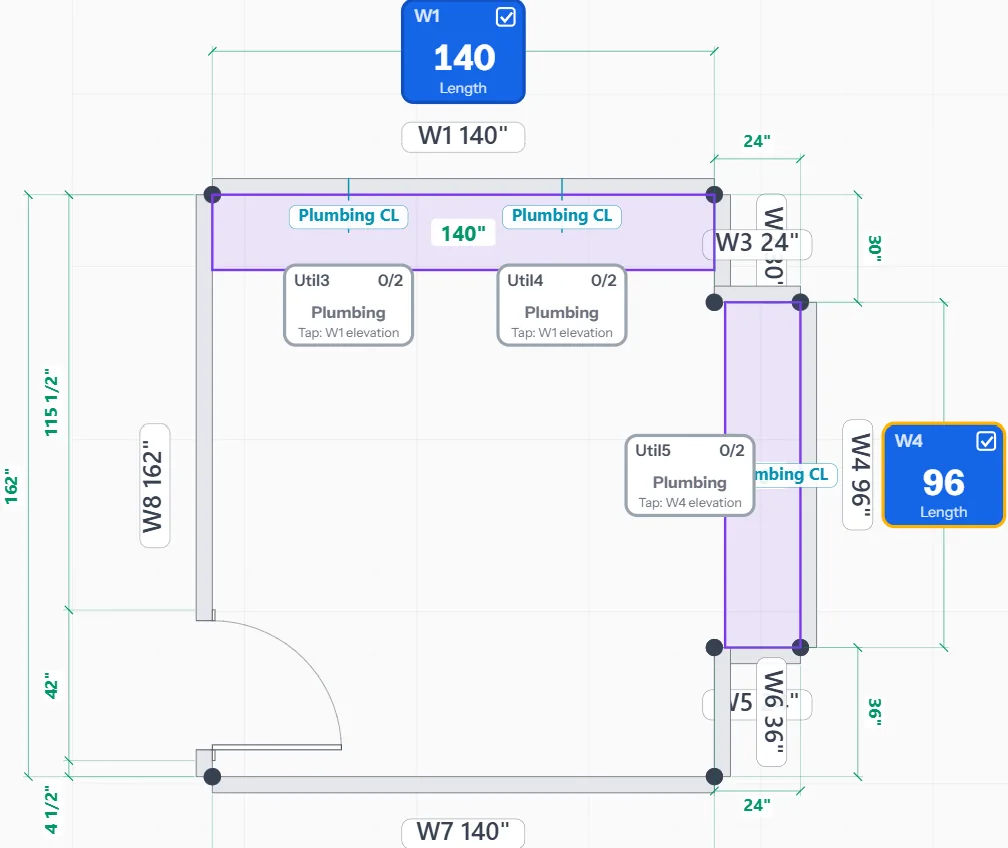
An elevation for every workspace wall, with the numbers cabinets need
From the placed doors and windows, Measure Confirm builds an elevation for each workspace wall and asks for the hard measurements that decide a layout: trim to wall, trim to trim, window head and sill, floor to mounting height. Shoot them with a Bluetooth laser or a digital tape and they land in the elevation without writing anything down.
Measuring in fractions? The fraction calculator takes a reading from tape to table: 79 9/16" goes in as you read it.
How measuring works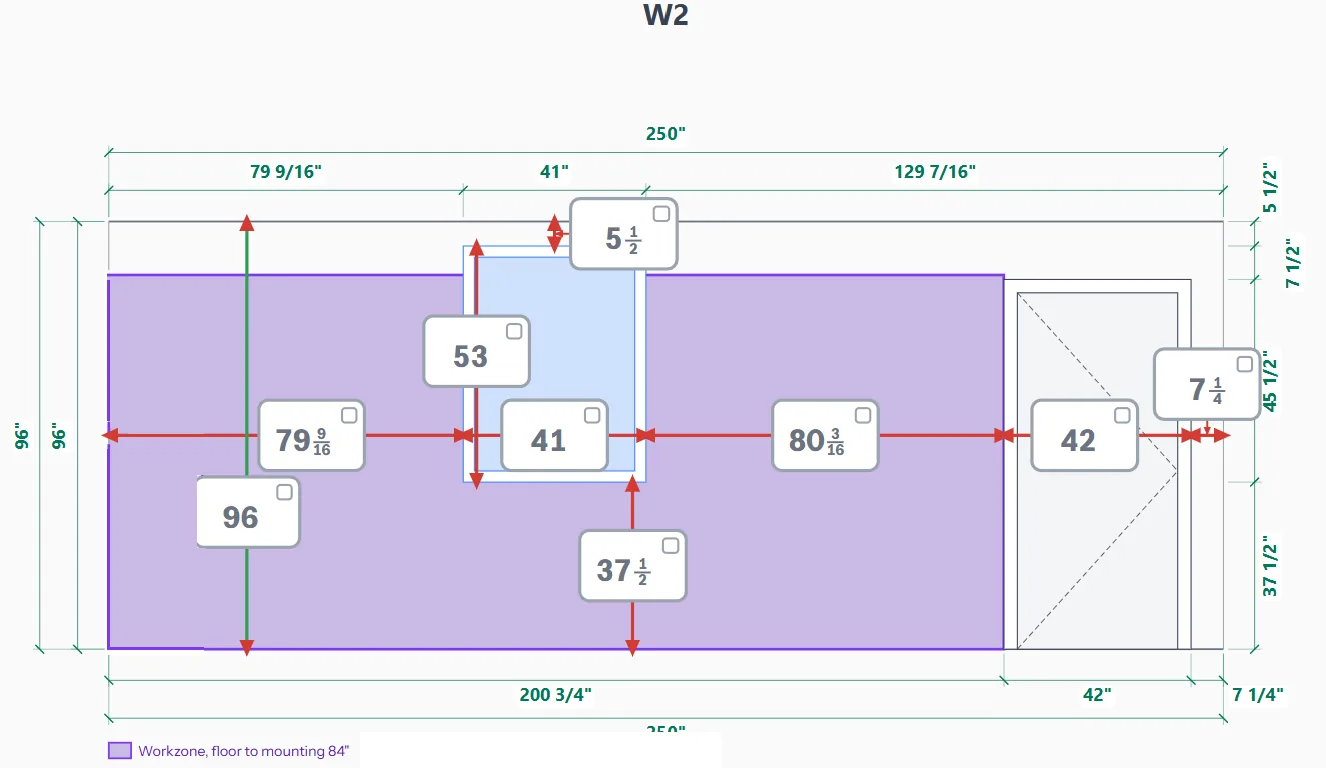
Tired of disjointed measuring workflows?
Measure the actual space. Keep the job's photos and notes with the walls they belong to.
Measure the actual space for kitchen and bath design
- Walk the room wall by wall; the keypad is built for tape readings
- Workzones for the sink, range and fridge walls, with plumbing centerlines
- Elevations with trim-to-wall and trim-to-trim for every workspace wall
- Pony walls, islands and back-to-back runs as real wall types
- Graph paper
- Tape + clipboard
- Redrawing in 2020
- Re-measure visits
- Drafting services
A field resource for project work
- Photos pinned to the wall or opening they show
- Complete-measure checklist so nothing leaves the site half-measured
- MeasureTech Chat: linear footage of a workspace for a custom-shop quote, square footage of the walls, the next step in the workflow
- Works offline; every room of the job on one Project Board
- Camera roll
- Texted photos
- Paper checklists
- Calls to the installer
- Site re-visits
Simplify your connections
The design software you already draw in, the devices already in the truck, and the files that move between them.
- 2020 Design FlexImport a room from 2020.dxf
- ProKitchenRoom import.dxf
- SketchUpModel import.dae
- Chief ArchitectRoom import from a DXF.dxf
- Sketch & photoA paper sketch or a site photo.png .jpg
- 2020 Design FlexOpens as real walls, doors and windows.xml
- ProKitchenMade for its DXF importer.dxf
- SketchUpMeasured geometry, not a background.dae
- Chief ArchitectImports the layered DXF.dxf
- AutoCAD · PDF · BlitzLayered DXF, client plan, Measure Copy.dxf .pdf
Built for the showroom, the truck and the install
One account for a solo designer. One invoice, roles and shared boards for a dealer with fifteen seats.
Your measures stay yours
A job stays on the device until you choose to export it. Team plans add roles, single sign-on, seat admin and one invoice, so the showroom owns its measures, not a measurer's phone. Coming soon
Easy onboarding
Measure a first room in ten minutes in the browser; nothing to install. Every kit and every Team plan comes with a 30-minute Measure Call, and we help a team move its open jobs across.
Trackable AI harnesses
MeasureTech Chat and the square check run on versioned, pinned agents. Every answer is logged against the wall it came from, so a designer can see why a wall was flagged and a team can audit what the AI did on a job.
Measure the job once. Open it in 2020 as real walls.
- Unlimited projects and clients, sketch import, 2020 XML and DXF export
- Pony and island walls with aisle checks, bath fixtures
- Invite a client to measure before the appointment Coming soon
a user a month · cancel any time
Start measuringMeasure your kitchen like a pro, then send it to your designer.
- Guided measuring, wall by wall, with the keypad and the square check
- Every room of the home on one Project Board
- Send the measure to a designer Coming soon, and cancel when the measuring is done
a week · cancel any time
Measure my homeMeasure with confidence: a digital tape and a 30-minute call with us.
Your choice of the REEKON T1M digital tape (1/32") or the Leica DISTO D1 laser (1/16"), a quick-start card, and a 30-minute Measure Call with a real person. Ship one to a client before the first meeting.
plus shipping
Get the kit, $149Measure the whole home once. Design it anywhere.
Runs in any browser today. iOS and Android apps with LiDAR scanning are next.